Kortext
 Canada · Product design
Kortext needed a scalable and intuitive user experience for their comprehensive digital learning platform. I owned the product design strategy and led the UX/UI for complex, data-intensive dashboards, aiming to simplify academic workflows, enhance user engagement, and establish a clean, cohesive design system.
 Figma
 Gemini
 Claude


 Read · Ask · Create: AI-assisted study workspace
 Generate quizzes with AI20 questions
UI/UX Evolution
Three iterations of the core study workspace: from a static notes list to a modular, AI‑assisted environment that keeps sources, chat and study tools in one view.
Before
Fragmented notes
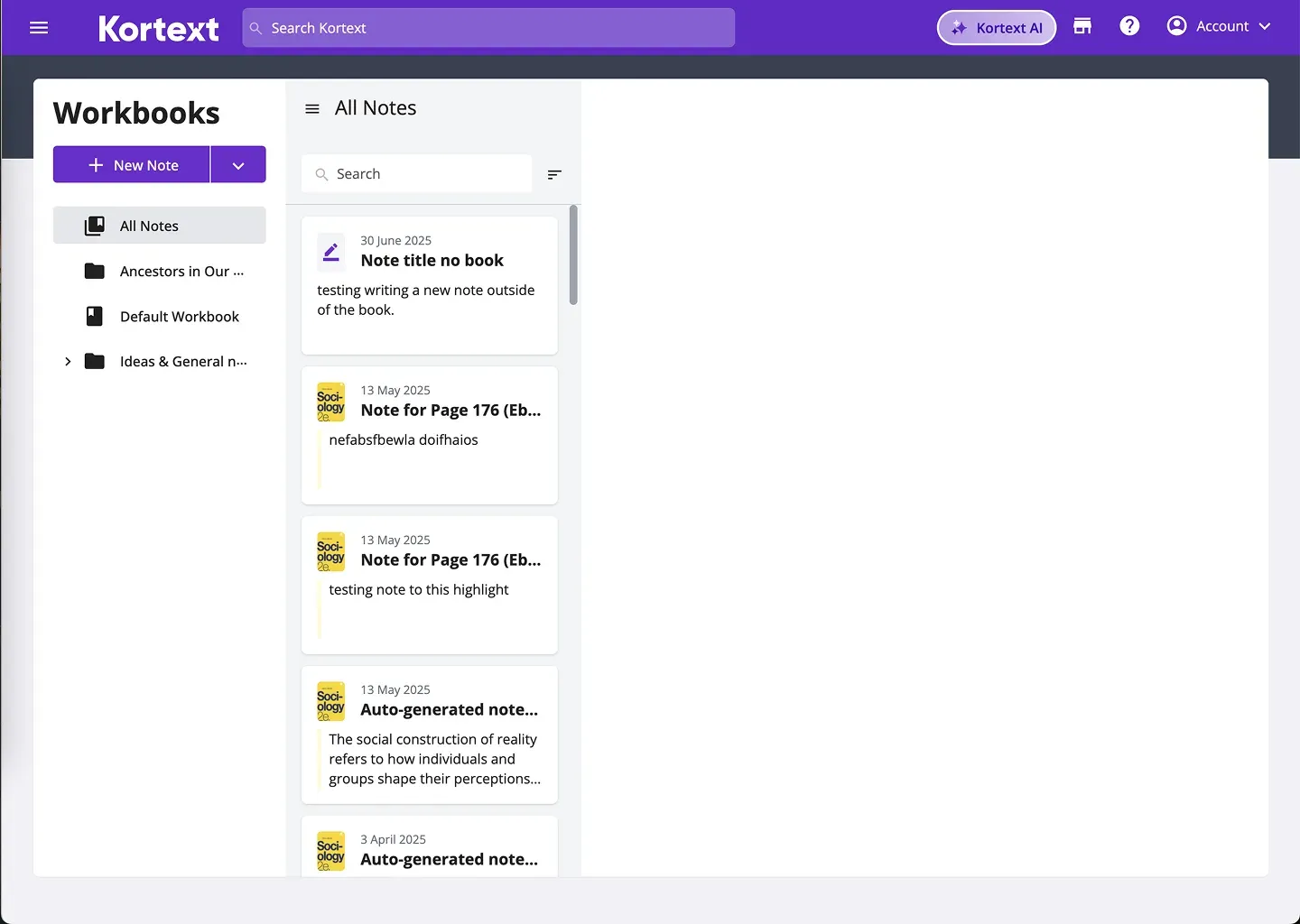
This is what the UI/UX looked like before I first joined the early project.
Iteration
Floating AI chat
Floating chat UI designed to assist users directly within the active workspace.

Final solution
Modular study workspace
Transforms fragmented insights into a modular and intuitive visual structure.

Problem + Requirements
The legacy Kortext “workbook” model was strictly linear, limiting students to static reading and basic note‑taking. The core problem was a fragmented learning experience: users had to switch contexts and tools to process and memorize their material.
My objective was to transform this rigid model into a unified, multi‑modal study workspace. I needed to design a centralized environment where every part of the learning journey could happen in one place.
Every time I switch from reading to solving problems I lose my train of thought. I wish it all happened in one place.
Key insight: Participant abandoned the task midway and restarted twice before completing it.
Switching between reading their work and filling in the rubric spreadsheet makes it really hard to give thoughtful feedback.
Key insight: User toggled between two windows 22 times. Feedback quality dropped in later submissions.
Mental Model & User Journey
The core architecture for the new workspace was designed around a natural learning loop: from consumption, to comprehension, to active creation.
- Source
Students begin with their primary materials.
- AI Chat
They question and synthesize them with the AI chat.
- Study Artifacts
They create quizzes, flashcards, audio tracks.
A predictable yet adaptable pathway gave students a clear navigational anchor, so advanced AI tools felt intuitive and digestible.
Solution • Modular Study Workspace
Integrating reading, note‑taking, and active study tools often causes cognitive overload, but by leveraging an AI assistant, we built a unified learning environment.
To support this, I designed a modular layout that dynamically adapts to the student’s task, keeping primary materials and interactive tools such as chat and flashcards instantly accessible on any screen.
Panel States
To maximize workspace efficiency, I designed a responsive panel system that dynamically scales to the student’s needs while providing a flexible foundation to accommodate future study tools and workflows seamlessly.
Source Panel
This is where all user-provided sources or “inputs” live. It’s the starting point of the user’s journey.
Action Panel
Where reading turns into understanding. This is the space for analyzing sources, shaping thoughts, and capturing work.
Chat Panel
As the focal point of the interface, the chat seamlessly adjusts its dimensions to support other tools as they open.
Source Panel
This is where all user‑provided sources or “inputs” live. It’s the starting point of the user’s journey.
Sources
Books
- The PhilosophesCharles Palissot
- EncyclopédieDenis Diderot
- Critique of Pure ReasonImmanuel Kant
- Thus Spoke ZarathustraFriedrich Nietzsche
- The SecondSimone de Beauvoir
- To the LighthouseVirginia Woolf
- Black Skin, White MasksFrantz Fanon
- Discipline and PunishMichel Foucault
Documents
- The PhilosophesCharles Palissot
- The PhilosophesCharles Palissot
+ Add Sources
- Source(s)Every user source is housed in a distinct section, making its format instantly recognizable at a glance.
- Add SourcesThe key interaction takes a single click, clearly featured as the biggest button on the panel.
Closed+
DefaultSources
Books
- The PhilosophesCharles Palissot
- EncyclopédieDenis Diderot
- Critique of Pure ReasonImmanuel Kant
- Thus Spoke ZarathustraFriedrich Nietzsche
- The SecondSimone de Beauvoir
- To the LighthouseVirginia Woolf
- Black Skin, White MasksFrantz Fanon
- Discipline and PunishMichel Foucault
Documents
- The PhilosophesCharles Palissot
- The PhilosophesCharles Palissot
+ Add Sources
OpenSources / View
Critique of Pure Reason
Immanuel Kant • 1781
Source Guide
Summary
In this foundational work, Immanuel Kant explores the limits of human knowledge, bridging the gap between rationalism and empiricism. He argues that while all knowledge begins with experience, the human mind actively shapes how we perceive reality.
Key Topic
- Epistemology
- Rationalism
- Empiricism
- Phenomena
- Human Perception
- Metaphysics
Critique of Pure Reason • First Edition (A), 1781
An Inquiry Governing the Limits and Scope of Human Cognition and Metaphysics
The Author, Immanuel Kant, does establish the foundational principles of human understanding as follows:Section 1. Core Proposition. This philosophical treatise may be cited as the "Critique of Pure Reason."
Section 2. Purpose. The purpose of this critique is to establish the boundaries of human understanding, specifically analyzing how knowledge is synthesized by the mind independent of sensory experience.
Section 3. Definitions. For the purposes of this transcendental philosophy, the following terms shall have the following meanings:
(a) "A priori" means any knowledge that is absolutely independent of all experience and derived purely from the inherent structures of the reasoning mind.
(b) "A posteriori" means empirical knowledge, or that which is possible only through direct sensory experience and observation.Sync with docs
- Closed
- Default
- Open
+
Sources
Books
- The PhilosophesCharles Palissot
- EncyclopédieDenis Diderot
- Critique of Pure ReasonImmanuel Kant
- Thus Spoke ZarathustraFriedrich Nietzsche
- The SecondSimone de Beauvoir
- To the LighthouseVirginia Woolf
- Black Skin, White MasksFrantz Fanon
- Discipline and PunishMichel Foucault
Documents
- The PhilosophesCharles Palissot
- The PhilosophesCharles Palissot
+ Add Sources
Sources / View
Critique of Pure Reason
Immanuel Kant • 1781
Source Guide
Summary
In this foundational work, Immanuel Kant explores the limits of human knowledge, bridging the gap between rationalism and empiricism. He argues that while all knowledge begins with experience, the human mind actively shapes how we perceive reality.
Key Topic
- Epistemology
- Rationalism
- Empiricism
- Phenomena
- Human Perception
- Metaphysics
Critique of Pure Reason • First Edition (A), 1781
An Inquiry Governing the Limits and Scope of Human Cognition and Metaphysics
The Author, Immanuel Kant, does establish the foundational principles of human understanding as follows:Section 1. Core Proposition. This philosophical treatise may be cited as the "Critique of Pure Reason."
Section 2. Purpose. The purpose of this critique is to establish the boundaries of human understanding, specifically analyzing how knowledge is synthesized by the mind independent of sensory experience.
Section 3. Definitions. For the purposes of this transcendental philosophy, the following terms shall have the following meanings:
(a) "A priori" means any knowledge that is absolutely independent of all experience and derived purely from the inherent structures of the reasoning mind.
(b) "A posteriori" means empirical knowledge, or that which is possible only through direct sensory experience and observation.Sync with docs
Action Panel
Where reading turns into understanding. This is the space for analyzing sources, shaping thoughts, and capturing work.
Actions
Create
- Quizzes
- Flashcards
- Notes
- Evaluation
All
- The Ultimate Book Challen...Book: The Philosophes
- Philosophical LettersBook: The Philosophes
- Notes about DenisDenis Diderot was a prominent Fre...
- Reflections on ExistenceBased on 3 sources
- Musings on the MindKnown for his contributions to lite...
- Letters of ContemplationCo-founder of the Encyclopédie, p...
- Essays on ThoughtBook: The Philosophes
- Notes sur l'EncyclopédiePhilosopher and co-founder of the...
- Creation entry pointsQuick‑action buttons provide instant access to creating new study materials.
- Unified LibraryAll generated assets in one list, with icons making formats instantly recognizable.
ClosedAll
DefaultActions
Create
- Quizzes
- Flashcards
- Notes
- Evaluation
All
- The Ultimate Book Challen...Book: The Philosophes
- Philosophical LettersBook: The Philosophes
- Notes about DenisDenis Diderot was a prominent Fre...
- Reflections on ExistenceBased on 3 sources
- Musings on the MindKnown for his contributions to lite...
- Letters of ContemplationCo-founder of the Encyclopédie, p...
- Essays on ThoughtBook: The Philosophes
- Notes sur l'EncyclopédiePhilosopher and co-founder of the...
OpenActions / Notes
Kant and the Categorical Imperative
Normal
B
I
Immanuel Kant's moral philosophy is centered around the concept of the Categorical Imperative. Unlike hypothetical imperatives, which are conditional and based on personal desires, the categorical imperative is an absolute and unconditional moral obligation. Kant argued that individuals must act only according to a rule that they would logically wish to become a universal law for everyone.
This framework completely rejects morality based on consequences, focusing instead on strict duty, rational logic, and the inherent dignity of human beings.
Convert to source
- Closed
- Default
- Open
All
Actions
Create
- Quizzes
- Flashcards
- Notes
- Evaluation
All
- The Ultimate Book Challen...Book: The Philosophes
- Philosophical LettersBook: The Philosophes
- Notes about DenisDenis Diderot was a prominent Fre...
- Reflections on ExistenceBased on 3 sources
- Musings on the MindKnown for his contributions to lite...
- Letters of ContemplationCo-founder of the Encyclopédie, p...
- Essays on ThoughtBook: The Philosophes
- Notes sur l'EncyclopédiePhilosopher and co-founder of the...
Actions / Notes
Kant and the Categorical Imperative
Normal
B
I
Immanuel Kant's moral philosophy is centered around the concept of the Categorical Imperative. Unlike hypothetical imperatives, which are conditional and based on personal desires, the categorical imperative is an absolute and unconditional moral obligation. Kant argued that individuals must act only according to a rule that they would logically wish to become a universal law for everyone.
This framework completely rejects morality based on consequences, focusing instead on strict duty, rational logic, and the inherent dignity of human beings.
Convert to source
Chat Panel
As the focal point of the interface, the chat seamlessly adjusts its dimensions to support other tools as they open.
Chat
Contemporary strategic marketing
These sources provide a comprehensive exploration of the core principles of contemporary strategic marketing, spanning digital transformation, global brand positioning, and advanced consumer behavior analysis. The sources meticulously analyze market forces like competitive rivalry, rapid technological disruption, and shifting cultural demographics, using real-world business case studies to demonstrate their direct influence on market share and long-term brand equity.
Furthermore, data-driven strategies are deeply explored, clarifying essential concepts such as dynamic customer journey mapping, seamless omnichannel integration, and the critical interplay between market segmentation, targeting, and value-based positioning. Ultimately, the text highlights how these elements combine to foster a sustainable competitive advantage in a rapidly evolving global economy.
Save new noteGet started
- Explain topic
- Add note
- Summarise
Ask a question or make a request...
What is value-based positioning?How does tech disruption affect market share?- Instant summaryProvides instant context to build user confidence and clarity at a glance.
- Smart entry pointsSmart suggestions perfectly tailored to the specific content of the notebook.
- Suggested questionsEliminates empty‑state friction by guiding users to their first interaction.
Brand Identity
A cohesive visual system designed to build trust, ensure consistency, and reflect the product’s core values.
Press a tile to swap its ground.
Visual Assets
From media assets to launch campaigns, I produced the complete visual rollout. Check out some of my top picks below.
Workbook Guide
Help me create
Summary
These sources provide a comprehensive exploration of the core principles of contemporary strategic marketing, spanning digital transformation, global brand positioning, and advanced consumer behavior analysis. The sources meticulously analyze market forces like competitive rivalry, rapid technological disruption, and shifting cultural demographics, using
real-world business case studies to demonstrate their direct influence on market share and long-term brand equity.
Help me understand
Workbook in Reader
Bridging the gap between consumption and creation, the Workbook is designed to live natively alongside the Reader. This split‑view approach minimizes context switching, allowing users to instantly capture insights, draft notes, and generate study assets without ever losing their place in the source material.
Introduction to Sociology 2
Actions
Create
All
Nothing found
All
Actions / Quizzes
Statuses and roles
Question 1 of 3
Becoming a pharmacist is an example of which kind of status?
A pharmacist earns the position, so it is an achieved status. Ascribed statuses are the ones no one chooses.
Question 2 of 3
A part‑time job schedules a shift on the night before an exam. What does the text call this?
Two roles, worker and student, pull in opposite directions. Role strain is when a single role asks too much.
Question 3 of 3
In Goffman’s terms, where does the waiter joke and complain?
The kitchen is out of the guests’ view, so it is the back stage. The table is the front stage.
0 of 3
correct answers
Keys 1 to 4 answer, Enter goes on
Presentation of Self
1 / 5
Known 0 · To review 0
Saved as you type. An empty note is not kept.
Evaluation
- Quiz
- Not taken
- Flashcards known
- 0 of 5
- Highlights
- 0
- Notes
- 0
Counts what you did in this prototype when the evaluation was created.
In this prototype Kortext AI answers from the key terms of the chapter.
A sample item from your library. The items you create here open in full.
A status is a position a person holds in a group or in society, and each one comes with rights and duties. Some statuses arrive at birth or with age, and no one chooses them: being a daughter, a teenager or a pensioner. Others are earned or taken on, like becoming a pharmacist, a team captain or a first‑generation graduate. Sociologists call the first kind ascribed and the second achieved.
A role is what people expect from someone who holds a status. The status is the label; the role is the behavior that goes with it. Robert Merton pointed out that one status rarely carries a single role. A teacher deals with pupils, parents, colleagues and the head of school, and each group expects something a little different. Merton called this bundle of roles a role‑set.
Holding many roles has a cost. When one role asks for more time or energy than a person has, the result is role strain: a nurse on a double shift who still has notes to write is a familiar case. Role conflict appears when two roles pull in opposite directions, such as a part‑time job that schedules a shift on the night before an exam.
Most people handle these tensions without naming them. They rank their roles, keep some of them apart, or quietly let one go. The choices they make over the years say a lot about who they become.
Presentation of Self
We cannot see what a person thinks about the role they play. We can only watch what they do, and sociologists call that visible part role performance. Erving Goffman took the idea further and compared everyday life to theatre. In his view, people act out their roles in front of an audience and adjust the act to whoever is watching.
Goffman named this approach dramaturgy. Its central idea is impression management: the work we do to be seen the way we want. A job candidate rehearses answers and picks a jacket. A waiter is calm and polite at the table, then jokes and complains in the kitchen. Goffman described these two areas as the front stage and the back stage.
Settings and objects support the performance. A doctor’s white coat, a lecturer’s slides and a shop uniform tell the audience which scene they have entered and how to behave in it. When people read the scene differently, for instance when a dinner guest acts as if the house were a hotel, the performance breaks down and everyone in the room feels it.
Students perform too. The same person can be a careful note‑taker in a seminar, a relaxed teammate at practice and a reliable colleague at a weekend job. Each version is real, and each is fitted to a different audience.
Vova is a thoughtful, talented UI designer who truly understands the balance between form and function. During his year on my team, he stood out for his ability to refine features and suggest improvements that prioritized the user experience. If you're looking for a designer who thinks deeply about 'the why' behind every pixel, I highly recommend him.

Marina Robina (opens in a new tab)
Kortext · Head of Design & Innovation
Want to learn more about the process and design decisions?
Let’s talk